
Pricing Page
When choosing a model, don't just look at the name—also consider capabilities, cost, group, and real-world use cases
When many beginners first encounter the model list on the pricing page, they most commonly fall into two misunderstandings:
- Only looking at "which one is the newest or most popular"
- Only looking at "which one is the cheapest"
But for actual usage results, what matters more is: whether this model fits your use case.
What the pricing page looks like
The pricing page is divided into three sections: top navigation, left-side filters, and the central model list. On the left, you can filter by provider, available Token groups, billing type, and tags. The center displays model cards or a table view. Each card shows the model name, input/output unit prices (or per-request model price), provider, billing type (usage-based billing / per-request billing), and capability tags (such as Reasoning, Tools, Files, Vision, etc.). At the top, there are also controls for fuzzy search, copy, recharge price display, Ratio, and table view.
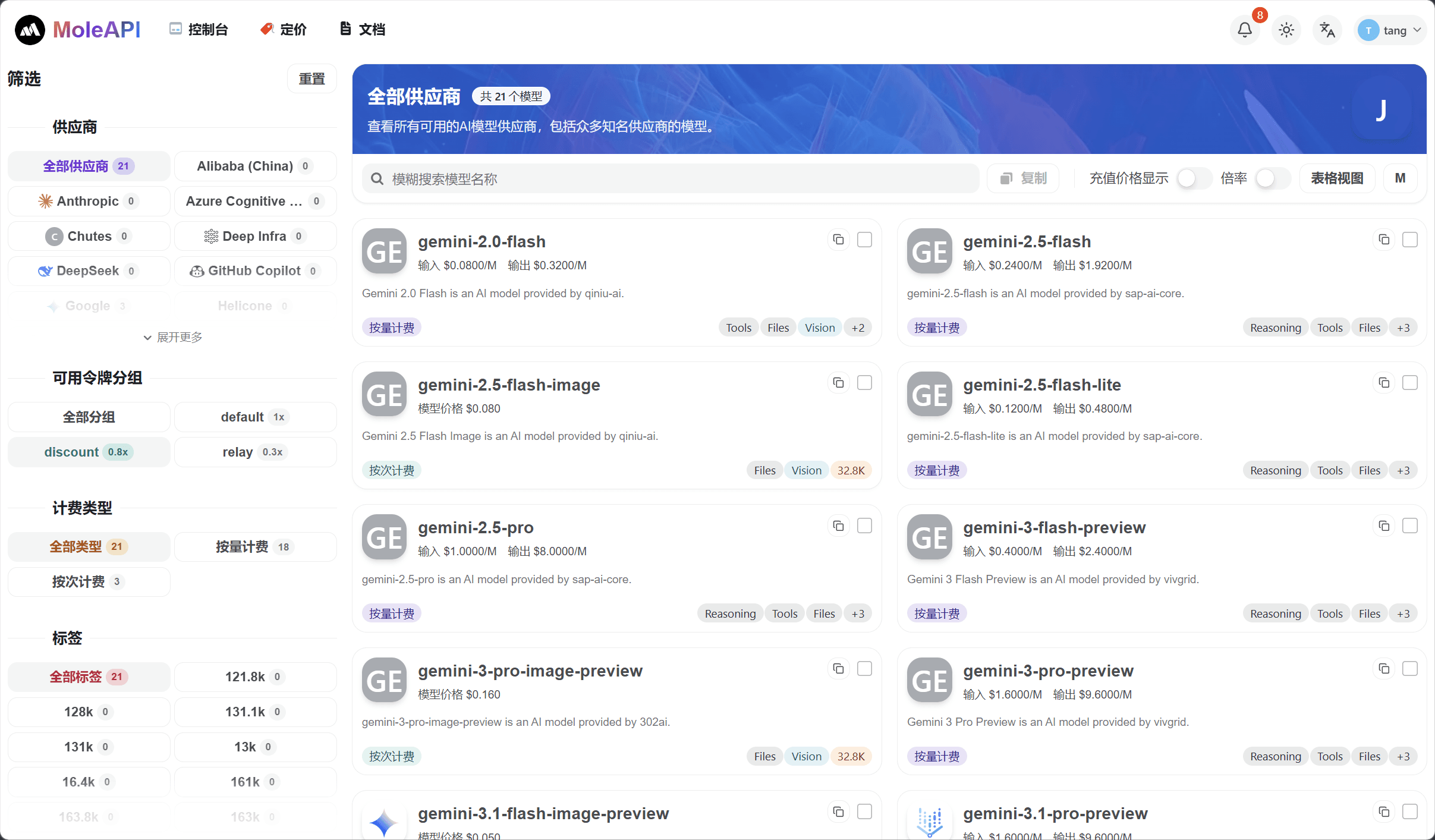
What questions you really need to answer when viewing the pricing page
Whether a model is suitable for you usually depends on answering at least these 4 questions:
- What can it do? (Check the capability tags and descriptions on the card.)
- Is it expensive overall? (Check the input/output unit prices or model price, and enable "Recharge Price Display" and "Ratio" if needed.)
- Can your current group use it? (Use the "Available Token Groups" filter on the left to narrow down models available to the group your Key belongs to.)
- Is it better for testing, or for production launch? (Judge based on cost and capabilities.)
The most practical way to choose a model
Step 1: Start by categorizing by task type
Don't rush to look at specific model versions yet. First, clarify what your task is:
- Text conversation
- Reasoning and Q&A
- Image generation
- Multimodal understanding
- Vector / embedding
- Speech-related tasks
You can use the page's tags or capability tags (such as Reasoning, Tools, Files, Vision) to quickly narrow the scope. Once you know what kind of model you're looking for, the rest of the selection process becomes much faster.
Step 2: Then layer by cost
Even among text models, costs can vary significantly. Each model in the list shows either input/output unit prices for usage-based billing or a model price for per-request billing.
It's recommended to mentally divide them into at least three tiers:
- Low-cost trial tier
- Daily general-purpose tier
- High-quality / high-cost tier
The benefits of this approach are:
- You won't burn through expensive models during testing
- You also won't start production with the "cheapest but unstable" option
If you need to compare actual costs across different groups, turn on "Ratio" and "Recharge Price Display".
Step 3: Finally, confirm group availability
This step is very important.
Just because you see that "the platform supports a model" does not necessarily mean your current API Key's group can call it immediately. The Available Token Groups section on the left lists each group (such as default 1x, discount 0.8x, relay 0.3x). After selecting the group your Key belongs to, the list in the center will show only the models available under that group.
So in the end, always come back to these two questions:
- Which group is the current Key using?
- Does that group support this model?
Recommended model selection strategies for beginners
If this is your first integration
It's recommended to start with:
- A general-purpose text model with an acceptable price
- Don't chase the most expensive model, and don't chase the absolute lowest price either
- First get the calling flow working, then compare models horizontally
If you're testing before a production launch
It's recommended to prepare:
- 1 primary model
- 1 backup model
That way, if the primary model's policy changes, pricing changes, or the experience is not suitable, you won't be scrambling at the last minute.
If you're very cost-sensitive
Then don't just look at the model name. Look at all of these together:
- Group
- Unit price
- Stability
- Actual output quality
Model selection approaches not recommended
- Seeing a new model and putting it directly into production
- Assuming the most expensive model is the best option by default
- Ignoring groups and assuming every Key can use every model
- Using the same set of high-cost models for both testing and production scenarios
One-sentence recommendation
Start with a model that is "good enough and stable," then gradually optimize for lower cost or higher quality.
What to read next
How is this guide?
Last updated on