
Wallet Page
Understanding your balance, top-ups, redemption codes, and referral rewards is the first step to using MoleAPI reliably
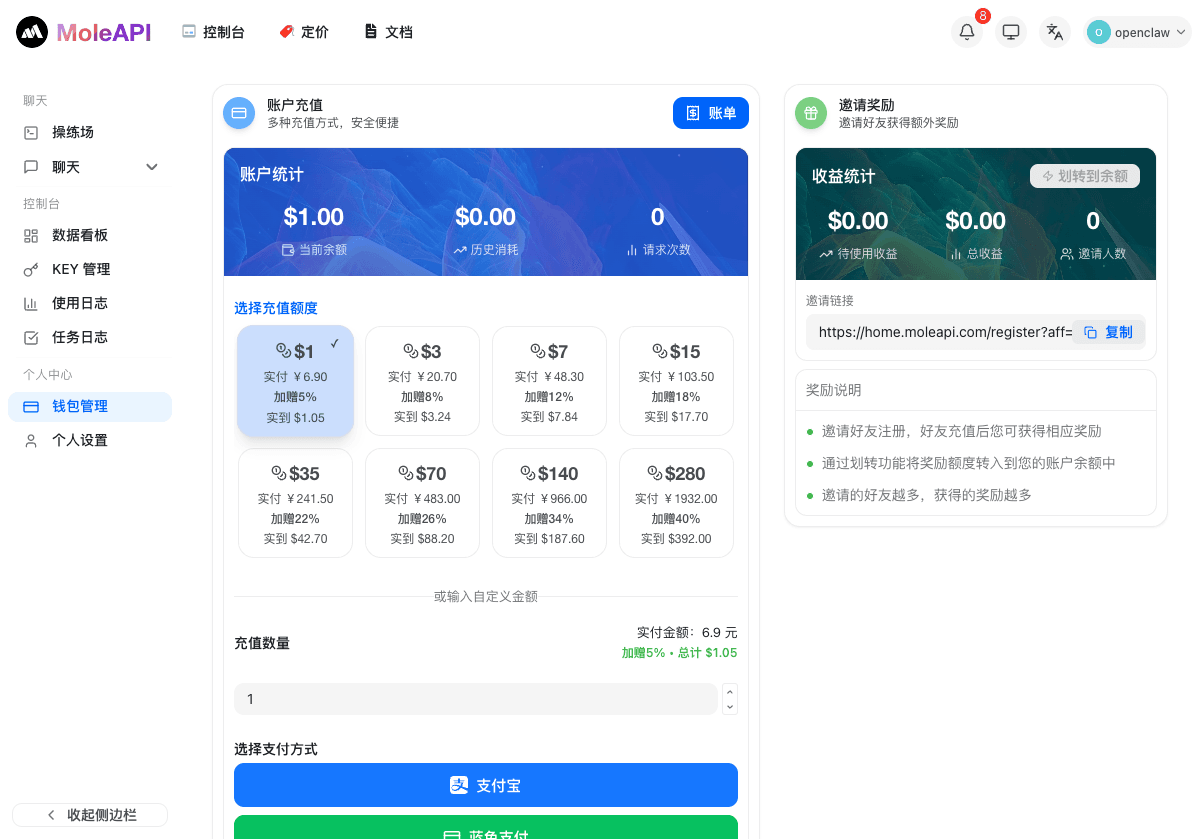
The wallet page is mainly used to view your balance, top up your account, and manage redemption codes and referral rewards.
Where to find the wallet page
Go from the left sidebar of the console:
Profile Center → Wallet Management- Direct link: https://home.moleapi.com/console/topup
The current page roughly looks like this:
What you can do on the wallet page
This is where you will mainly do the following:
- View your current balance, historical usage, and request count
- Select a top-up tier and complete payment
- Redeem Quota with a redemption code
- Check whether referral rewards have been credited
If your calls suddenly start failing, it is recommended to come back here first and confirm that your balance is sufficient.
Trial credit and referral rewards
New users receive $0.5 USD in trial credit by default, which can be used directly for test calls.
In addition, after you invite a friend to register, you can also receive a $0.5 USD trial credit reward. Once the reward is credited, you can view it on the wallet page.
Payment methods
Individual users can top up directly on the wallet page using the following methods:
- Alipay
- Lantu Pay
If this is your first integration, it is recommended to start with a small top-up, validate the full calling workflow, and then decide whether to continue topping up based on actual usage.
Top-ups and invoicing for enterprise customers
Enterprise customers support corporate payment.
You can apply for an invoice 7 days after the top-up is completed. Electronic invoices are provided by default, and the tax cost is covered by us.
If you need enterprise payment or invoicing support, it is recommended to submit the relevant information according to the platform guidance after topping up.
Usage recommendations
For users who are just getting started with MoleAPI, the recommended order for using the wallet page is:
- First, confirm whether you already have the
$0.5 USDtrial credit - If it is not enough, choose Alipay or Lantu Pay for a small top-up
- Run one real request successfully
- Once stable, decide whether to increase your top-up amount
Balance issues are the easiest production risk to overlook
Many failures are not because “the model is down”, but because the balance is insufficient, the API Key has reached its limit, or abnormal usage was not detected in time.
Recommended practices
- Testing phase: validate with a small amount first
- Production phase: keep a buffer balance
- Multiple projects: split costs by API Key
- Long-term usage: review together with notification alerts
What to read next
How is this guide?
Last updated on