
Understanding Ratios
Ratio settings are the core configuration of the MoleAPI billing system. Once you understand model ratios, completion ratios, cache ratios, and group ratios, you will be able to read the ratio information on the pricing page and quickly verify from logs why a request was charged that much.
Ratio System Overview
MoleAPI uses four types of Ratios to calculate user quota consumption:
- Model Ratio (
ModelRatio): Defines the model’s base billing multiplier - Completion Ratio (
CompletionRatio): Adjusts the price of output tokens separately - Cache Ratio (
CacheRatio): Adjusts the price of cached input tokens separately - Group Ratio (
GroupRatio): Applies differentiated billing for different groups
Relationship Between Quota and Ratios
In MoleAPI, final charges are uniformly converted into quota points.
1 USD = 500,000 quota points- User balance and consumption records are essentially increases and decreases in quota points
- Logs often show cost details in USD, but the backend ultimately converts them into quota points for deduction
Quota Calculation Formulas
Usage-based models (no cache hit)
Quota consumption = (number of input tokens + number of output tokens × Completion Ratio) × Model Ratio × Group RatioUsage-based models (with cache hit)
When a cache hit occurs, the Cache Ratio is not multiplied onto the total price. Instead, it applies only to the cached input tokens.
Quota consumption = (number of regular input tokens + number of cached tokens × Cache Ratio + number of output tokens × Completion Ratio) × Model Ratio × Group RatioPer-call models (fixed price)
Quota consumption = model fixed price × Group Ratio × 500,000Audio models (special handling, automatically processed internally by new-api)
Quota consumption = (text input tokens + text output tokens × Completion Ratio + audio input tokens × audio ratio + audio output tokens × audio ratio × audio completion ratio) × Model Ratio × Group RatioPre-consumption and Post-consumption Mechanism
MoleAPI uses a two-phase billing process: pre-consumption and post-consumption:
- Pre-consumption: Before the request is sent, quota is pre-deducted based on estimated tokens
- Post-consumption: After the request ends, charges are recalculated based on actual tokens
- Adjustment: If the actual cost differs from the pre-deducted cost, the system automatically deducts or refunds the difference
Pre-consumed quota = estimated number of tokens × Model Ratio × Group Ratio
Actual quota = actual number of tokens × Model Ratio × Group Ratio
Quota adjustment = actual quota - pre-consumed quota
Model Ratio Settings
The Model Ratio defines the base billing multiplier for different AI models. The system provides default values for common models.
Common Model Ratio Examples
| Model Name | Model Ratio | Completion Ratio | Official Price (Input) | Official Price (Output) |
|---|---|---|---|---|
| gpt-4o | 1.25 | 4 | $2.5/1M Tokens | $10/1M Tokens |
| gpt-3.5-turbo | 0.25 | 2 | $0.5/1M Tokens | $1.0/1M Tokens |
| gpt-4o-mini | 0.075 | 4 | $0.15/1M Tokens | $0.6/1M Tokens |
| o1 | 7.5 | 4 | $15/1M Tokens | $60/1M Tokens |
You can interpret the meaning of these ratios as follows:
- The higher the Model Ratio, the higher the overall base cost
- The higher the Completion Ratio, the more expensive output tokens are
- The lower the Cache Ratio, the more you save when cache hits occur
- The lower the Group Ratio, the lower the final charge to the user
Completion Ratio Settings
The Completion Ratio is used to apply additional billing to output tokens, mainly to reflect the real-world cost difference where output is more expensive than input.
Default Completion Ratios
| Model Type | Official Price (Input) | Official Price (Output) | Completion Ratio | Notes |
|---|---|---|---|---|
| gpt-4o | $2.5/1M Tokens | $10/1M Tokens | 4 | Output is 4x input |
| gpt-3.5-turbo | $0.5/1M Tokens | $1.0/1M Tokens | 2 | Output is 2x input |
| gpt-image-1 | $5/1M Tokens | $40/1M Tokens | 8 | Output is 8x input |
| gpt-4o-mini | $0.15/1M Tokens | $0.6/1M Tokens | 4 | Output is 4x input |
| Other models | 1 | 1 | 1 | Input and output are billed equally |
How to Read Ratios on the Pricing Page
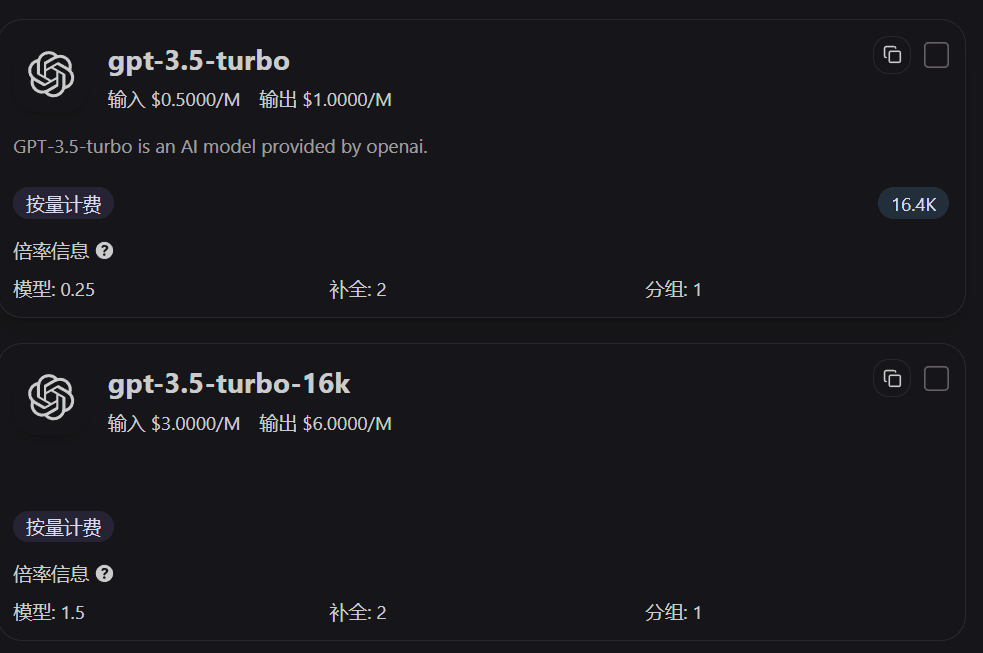
Model cards on the pricing page directly display the Model Ratio, Completion Ratio, and Group Ratio. By checking these three values first, you can quickly tell why one model is more expensive than another for the same call.
Cache Ratio Settings
The Cache Ratio is one of the easiest things to misunderstand when reading logs for the first time.
What Exactly Does the Cache Ratio Apply To?
It applies only to cached input tokens, and does not apply to:
- Regular input tokens that did not hit the cache
- Output tokens
- The total price of the entire request
In other words, if a request includes both regular input and cached input, they are calculated separately at different prices, and then multiplied together by the Group Ratio.
When Will You See the Cache Ratio in Logs?
If the upstream model supports prompt caching and the request actually hits the cache, the logs will usually include:
Cached TokensCache RatioCache Price
If there is no cache hit, these lines will not participate in the final cost calculation.
Group Ratio Settings
The Group Ratio allows you to set differentiated pricing for different channel groups, enabling strategies such as default groups, discount groups, relay groups, and trial groups.
Group Ratio Configuration
{
  "default": 1,
  "discount": 0.8,
  "relay": 0.3,
  "trial": 0.1
}
Q: How does the Group Ratio take effect?
A: The Group Ratio is applied to the entire request in the final step. You can think of it as the “final price coefficient” presented to the user.
Q: What is the purpose of the Completion Ratio?
A: The Completion Ratio is mainly used to balance the cost difference between input and output tokens. For many models, output pricing is significantly higher than input pricing, so logs calculate output tokens separately using the Completion Ratio.
Q: What is the purpose of the Cache Ratio?
A: The Cache Ratio only affects cached input tokens. The lower the Cache Ratio, the lower the actual cost of that portion of tokens when a cache hit occurs.
QA Calculation Examples
The following examples are not abstract formulas. They walk through the calculation directly using fields from the logs.
Q1: Why is there an extra “Cache Price” line in the log for a request with cache hits?
Because this request hit the cache, the system splits the input tokens into two parts:
- Regular input tokens: calculated at the input price
- Cached input tokens: calculated at the input price multiplied by the Cache Ratio
In the following log, you can see Cached Tokens 3072, Cache Ratio 1, and Cache Price:
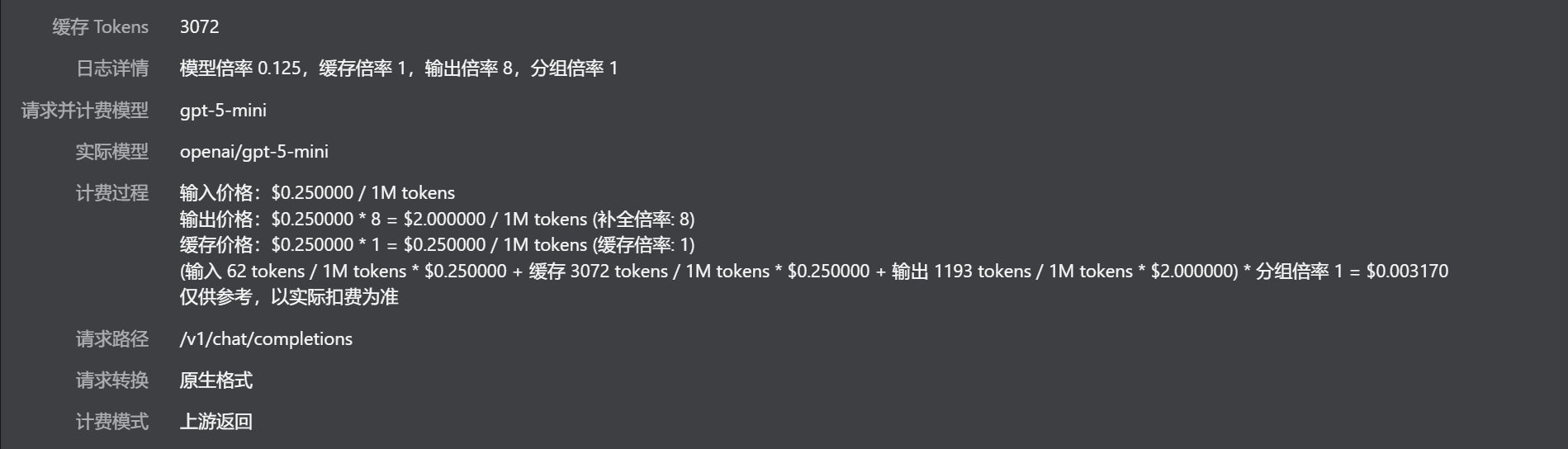
Based on the numbers in the log, the calculation is:
Input cost = 62 / 1M × $0.250000 = $0.0000155
Cache cost = 3072 / 1M × $0.250000 = $0.000768
Output cost = 1193 / 1M × $2.000000 = $0.002386
Final cost = (input cost + cache cost + output cost) × Group Ratio 1
           = $0.0031695
           ≈ $0.003170
Converted into quota points, that is approximately:
$0.003170 × 500,000 ≈ 1,585 quota pointsQ2: How should the cost be verified when there is no cache hit?
When there is no cache hit, you only need to check the regular input and output parts. No cache price will appear.
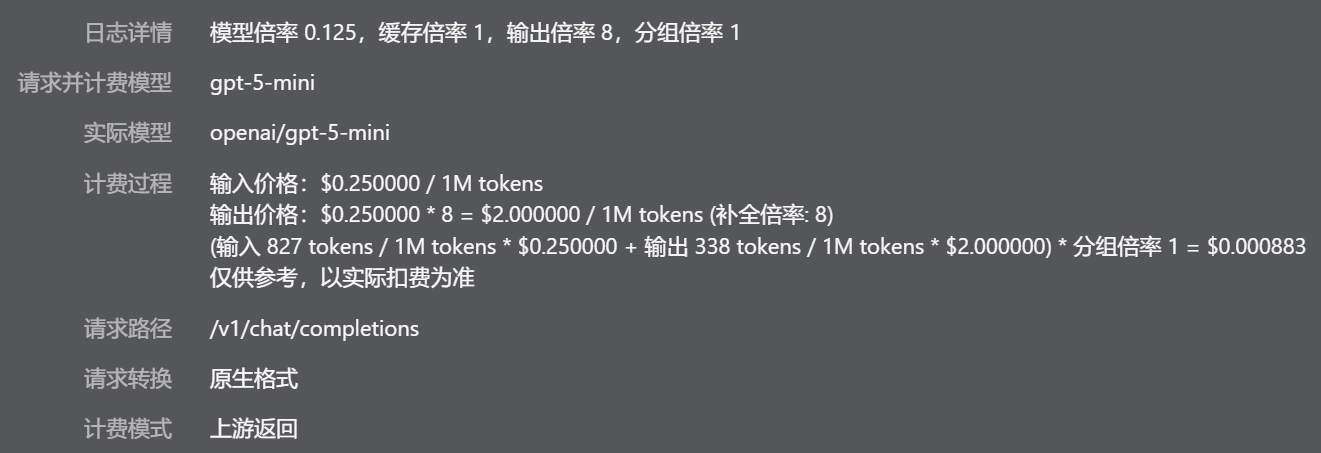
The fields in the log correspond to the following calculation:
Input cost = 827 / 1M × $0.250000 = $0.00020675
Output cost = 338 / 1M × $2.000000 = $0.000676
Final cost = (input cost + output cost) × Group Ratio 1
           = $0.00088275
           ≈ $0.000883
Converted into quota points, that is approximately:
$0.000883 × 500,000 ≈ 441 quota pointsQ3: When both Cache Ratio and Group Ratio exist, which should be calculated first?
First calculate the costs of the three parts separately: regular input, cache, and output. Then apply the Group Ratio to the total. The following log includes all of these:
- Model Ratio
1.25 - Cache Ratio
0.1 - Output Ratio
6 - Group Ratio
0.3
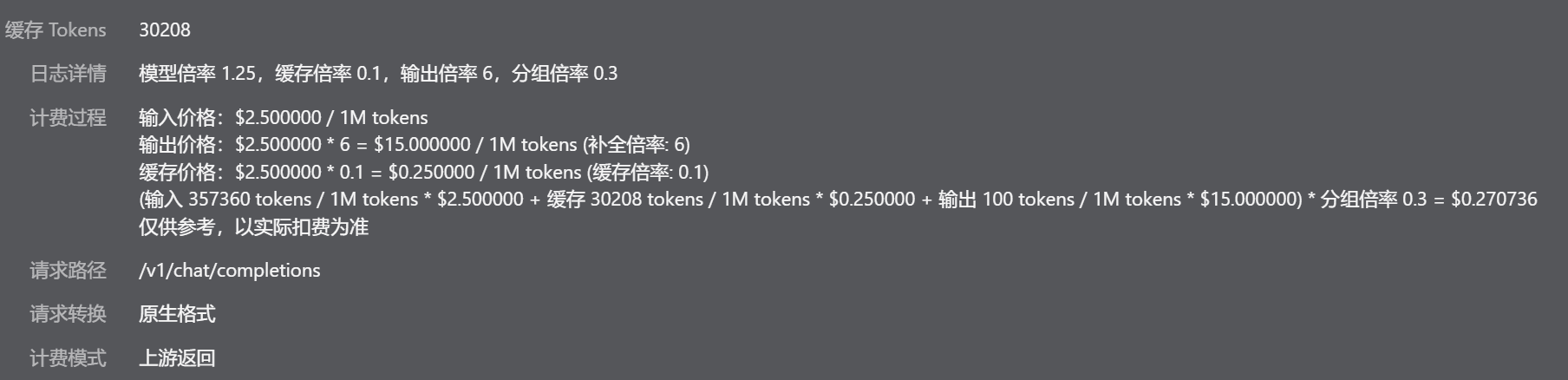
Using the price details in the log:
Regular input cost = 357360 / 1M × $2.500000 = $0.893400
Cache cost = 30208 / 1M × ($2.500000 × 0.1) = $0.007552
Output cost = 100 / 1M × $15.000000 = $0.001500
Final cost = (regular input cost + cache cost + output cost) × Group Ratio 0.3
           = ($0.893400 + $0.007552 + $0.001500) × 0.3
           = $0.2707356
           ≈ $0.270736
This is also why the log shows these separately:
- Input price:
$2.500000 / 1M tokens - Output price:
$15.000000 / 1M tokens - Cache price:
$2.500000 × 0.1 = $0.250000 / 1M tokens
Q4: How can you tell from the ratios whether a model card is likely to be expensive?
The simplest order is:
- Check the Model Ratio first to judge whether the model has a high base cost
- Check the Completion Ratio next to see whether output content will be significantly more expensive
- If the model supports caching, check the Cache Ratio to estimate how much cache hits can save
- Finally, check the Group Ratio to determine the actual user-facing price under your current group
If you see a model on the pricing page with:
- A high Model Ratio
- A high Completion Ratio
- A high Group Ratio
Then it will usually be noticeably more expensive in long-output scenarios. Conversely, if the Cache Ratio is low and the cache hit rate is high, the actual cost of this type of request will decrease more noticeably.
For more billing rules, see FAQ
How is this guide?
Last updated on