
What Is a Group
Understand how MoleAPI groups relate to model availability, pricing strategies, and stability
In MoleAPI, a group can be understood as “which set of model channels and pricing strategies an API Key uses.”
It is not just a display field. It directly affects:
- Which models this Key can access
- What type of channel is used when calling those models
- The corresponding pricing strategy
- In some cases, stability and applicable use cases
Why groups exist
If the platform mixed all models, all prices, and all channels together, it would be difficult for users to distinguish them by purpose.
Groups exist so you can manage different goals separately, for example:
- Use different groups for test and production environments
- Route cost-sensitive traffic to a cheaper group
- Route stability-sensitive traffic to a more stable group
- Restrict certain models to specific Keys only
How to think about a group
A more practical way to understand it is:
Group = a combination of model set + channel strategy + pricing strategy
So even for the same model, different groups may result in:
- Different availability; switching groups may make a model unavailable
- Different unit prices; some groups may include discounts
- Different stability characteristics; for example, the relay group may be less stable
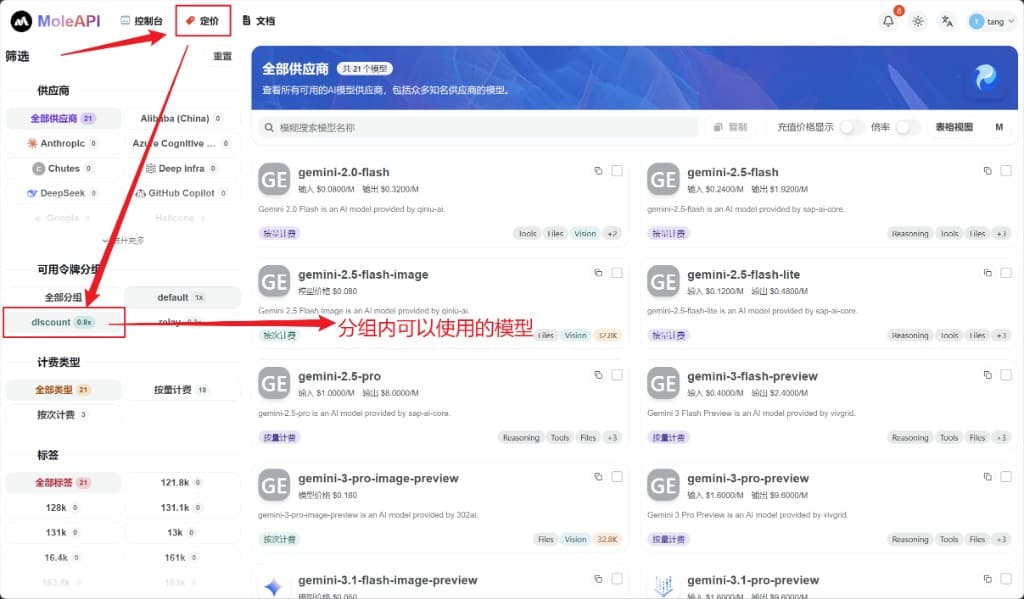
On the left-side filter of the pricing page in the console, select Available Token Groups to view the list of models visible under that group.
Common group types
These are some of the most common and easiest-to-understand group types in the documentation:
| Group Type | Characteristics | Suitable Scenarios |
|---|---|---|
default | The default group, usually more stable and general-purpose | Production projects, long-term usage |
discount | Promotional or discounted group | Cost-sensitive scenarios where you are willing to track promotion changes |
relay | Usually lower priced, but the experience may depend more on the specific channel | Testing, experimentation, and more cost-sensitive scenarios |
Actual availability is subject to the current group information shown in the console and system announcements.
What beginners should choose
If this is your first integration, we recommend:
- Start with the default group to get the workflow working
- After that, adjust based on price, model coverage, and stability
This is because for beginners, getting things working successfully is more important than maximizing cost savings right away.
When you should distinguish groups carefully
In the following scenarios, you should plan your groups explicitly:
1. Separate production and testing
Do not mix test traffic and production business traffic under the same strategy.
2. You want to control costs
If you are highly price-sensitive, groups are a very important adjustment tool.
3. Different systems have different permissions
For example:
- Internal experimental projects can use lower-cost groups
- Production products expose only a small set of stable models
4. You want to compare channel performance
Sometimes the same model behaves differently under different groups. This is a good fit for small-scale testing before deciding on a long-term strategy.
Relationship between groups and API Keys
A group is usually configured on the API Key. When creating or editing an API Key, choose the group for that Key under Token Group (such as default, discount, or relay). Different groups correspond to different ratios and model scopes.
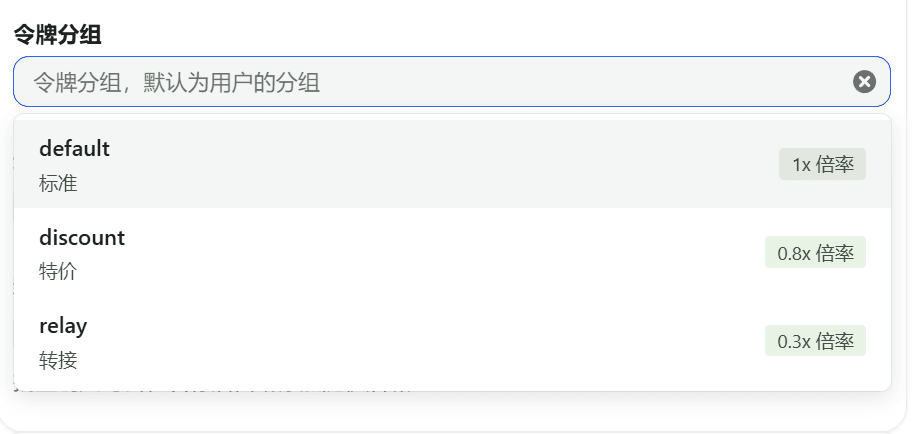
This means:
- Different Keys can use different groups
- The same account can have multiple strategies at the same time
- You can assign different Keys by project or environment, then configure different groups for them
This is also why we often recommend:
- One test Key
- One production Key
- If needed, one Key for each system
Usage recommendations
Recommended practices
- Beginners should start with
default - Split multiple Keys by environment
- Prioritize stability for critical business workloads before considering cheaper groups
- Run real tests in the target group before going live
Not recommended
- Using one Key and one group for all projects
- Switching production traffic directly to an unfamiliar group before understanding it
- Looking only at price without considering model availability and stability
One-line recommendation
Start with the default group to get things working, then optimize your group selection based on cost, model, and stability requirements.
What to read next
How is this guide?
Last updated on