
CC Switch - Unified AI CLI Management Tool
CC Switch Guide — A cross-platform AI CLI management tool for centrally managing Provider configurations, MCP servers, and system prompts for Claude Code, Codex, and Gemini CLI. Connect to MoleAPI and fill in settings with one click.
🔀 CC Switch is an open-source, cross-platform unified AI CLI management tool. It supports one-click switching of Provider configurations for Claude Code, Codex, and Gemini CLI, centralized management of MCP servers, management of system prompts (Prompts), and management of Skills extensions, allowing you to switch freely between multiple AI coding assistants without manually editing configuration files.
- GitHub repository: https://github.com/farion1231/cc-switch
- Download: GitHub Releases
Key Features
🔌 Provider Management
- One-click switching — Switch between API configurations for Claude Code, Codex, and Gemini with one click, without manually modifying environment variables or configuration files
- Multiple endpoint support — Each Provider can be configured with multiple endpoints, with support for API Key management and latency testing
- 4-layer model configuration — Supports four levels of model granularity: Haiku / Sonnet / Opus / Custom
🛠️ MCP Server Management
- Unified cross-application management — Manage MCP servers for Claude / Codex / Gemini from a single panel
- Three transport types — Supports stdio, HTTP, and SSE (Server-Sent Events)
- Automatic sync — Unified import/export + bidirectional sync
💬 Prompts Management
- Multiple preset system prompts — Unlimited presets with quick switching
- Cross-application support — Claude (
CLAUDE.md), Codex (AGENTS.md), Gemini (GEMINI.md) - Markdown editor — CodeMirror 6 + live preview
🌐 Multi-Platform Support
- Desktop app — Native installers for Windows, macOS, and Linux
- Web version — Browser-based access for headless servers / remote SSH environments
- CLI version — Supports both interactive command-line mode and command mode
How to Connect to MoleAPI
CC Switch supports the ccswitch:// Deep Link protocol, allowing you to import Provider configurations with one click from the MoleAPI token management page.
Configuration Steps
-
On the MoleAPI token management page, click the dropdown menu for the corresponding token Select the CC Switch option from the menu. The system will automatically launch the CC Switch app and open the configuration dialog.
-
Complete the configuration in the dialog
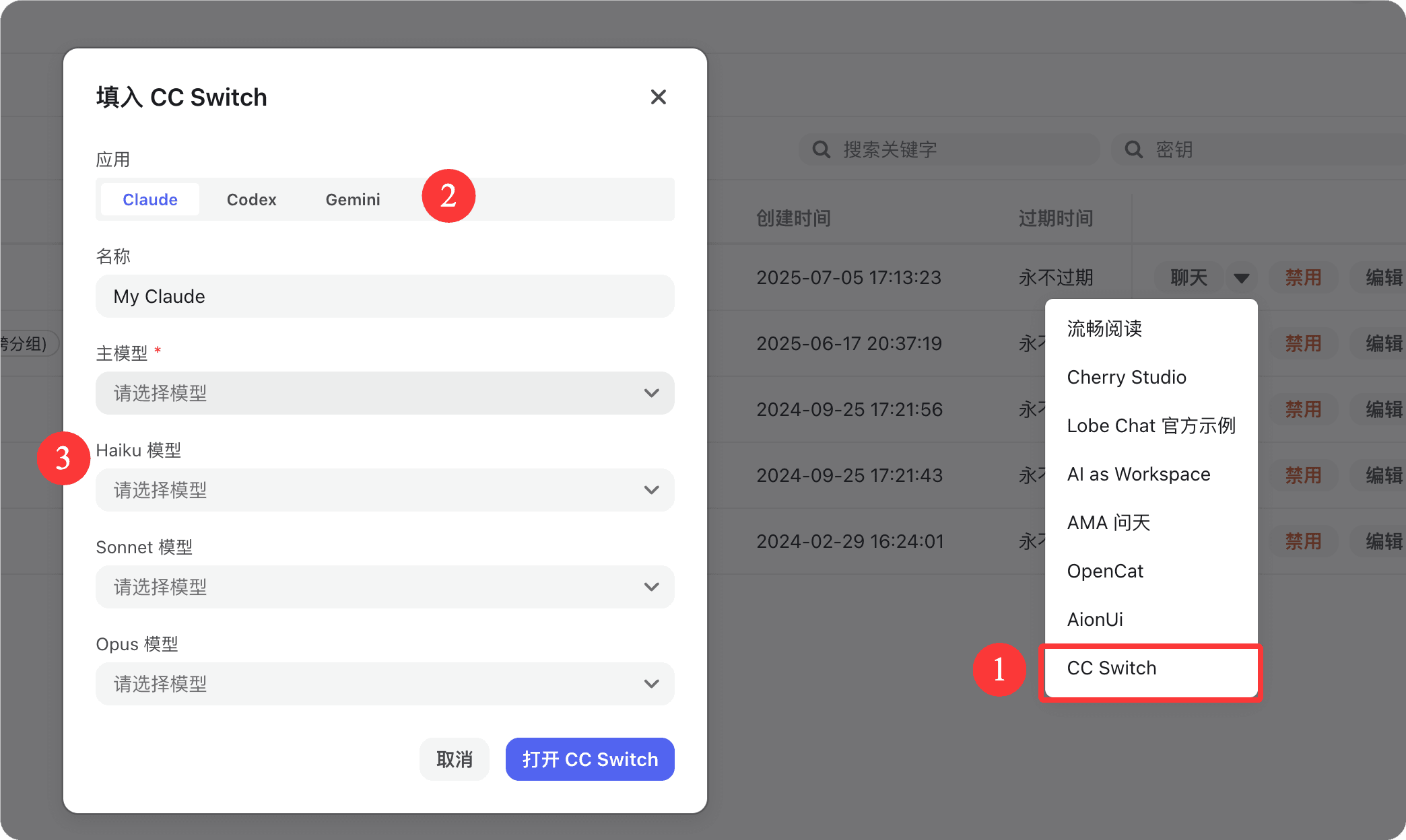
Field descriptions in the dialog:
- Application: Switch the application type at the top — Claude / Codex / Gemini. Select the target application as needed
- Name: Enter a name for this configuration (for example,
My Claude) to make it easier to identify and switch in CC Switch later - Primary Model (required) — The default main model
- Haiku Model — Lightweight and fast model
- Sonnet Model — Balanced model
- Opus Model — Most capable model
All models are selected from dropdown lists. If no model is selected, "Please select a model" is shown.
-
Finish the configuration Click "Open CC Switch" to import the configuration into CC Switch and start using it; click "Cancel" to discard this operation.
Installation
macOS (Homebrew recommended)
brew tap farion1231/ccswitch
brew install --cask cc-switch
Windows
Download the .msi installer or portable .zip package from Releases.
Linux
Download the .deb package or .AppImage from Releases.
For ArchLinux users:
paru -S cc-switch-binWeb Version (Headless / SSH Server)
wget https://github.com/farion1231/cc-switch/releases/latest/download/cc-switch-web-linux-x64.tar.gz
tar -xzf cc-switch-web-linux-x64.tar.gz
cd cc-switch-web/
./cc-switch-web
The default port is 17666. Access it in your browser at http://localhost:17666.
Related Links
How is this guide?
Last updated on
AionUi - Free and Open-Source Desktop Productivity Agent
AionUi Tutorial — A free, open-source desktop productivity Agent that supports Gemini CLI, Claude Code, Codex, and more AI agents. Connect to MoleAPI to enable multi-model workflows.
Cherry Studio - Desktop AI Client
Cherry Studio Tutorial — Connect the desktop AI client to MoleAPI and fill in the API Key with one click. Built in with 30+ professional AI assistants covering a wide range of work scenarios.