
How to Set the Base URL
Filling in the correct Base URL is the first step to getting your MoleAPI integration working
Base URL is the base address used by a client or SDK when sending API requests.
You can think of it as “where the request should be sent.” If this address is incorrect, your request will still fail even if your API Key is correct.
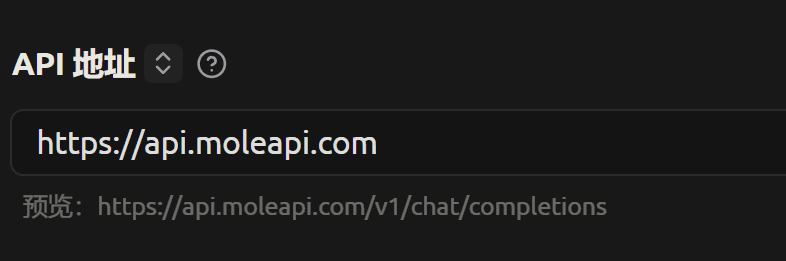
The most common MoleAPI configuration
For the vast majority of tools and SDKs that support OpenAI-compatible interfaces, we recommend entering:
https://api.moleapi.com/v1This is the one configuration beginners should remember first.
Why many scenarios require /v1
Because many SDKs or clients automatically append paths like the following to the Base URL you provide:
/chat/completions/responses/embeddings/images/generations
So if you enter:
https://api.moleapi.com/v1The final full URL it constructs may look like this:
https://api.moleapi.com/v1/chat/completionsThis is usually correct.
When you can omit /v1
A small number of tools require you to enter the “site root URL” and then append /v1 internally.
In that case, you can try:
https://api.moleapi.comBut if you are not sure, try https://api.moleapi.com/v1 first.
Simple takeaway for beginners
If you are not sure what to enter, start with: https://api.moleapi.com/v1
Most common incorrect formats
Error 1: Using the official OpenAI URL
For example:
https://api.openai.com/v1In this case, the request will not go through MoleAPI and will instead be sent directly to OpenAI.
Error 2: Missing /v1
Some applications require the URL to include /v1. If you enter only:
https://api.moleapi.comYou may see:
- 404
- Invalid URL
- Endpoint does not exist
- Incorrect request path concatenation
Error 3: Using the full endpoint path as the Base URL
For example, if you enter:
https://api.moleapi.com/v1/chat/completionsThis is usually incorrect, because many SDKs will continue appending a path after it, resulting in a malformed URL.
Unless a tool explicitly requires the full endpoint URL, the Base URL should generally be only:
https://api.moleapi.com/v1Error 4: Extra spaces, full-width punctuation, or the wrong protocol when copying
For example:
https//api.moleapi.com/v1http://api.moleapi.com/v1- Extra spaces before or after the URL
- Full-width characters pasted into the address
These issues are very common, and they are not always immediately obvious at a glance.
How to quickly check whether your Base URL is correct
You can check in this order:
- Whether the Base URL is
https://api.moleapi.com/v1 - Whether the API Key is the
sk-...you created in the MoleAPI console - Whether the model name is available under the current group
- Whether the client supports OpenAI-compatible interfaces
If all of these are confirmed and it still fails, then check the detailed logs and error codes.
Recommendations for common scenarios
Scenario 1: Third-party client integration
For tools such as Chatbox, NextChat, immersive translation tools, and Cherry Studio:
- Prefer
https://api.moleapi.com/v1 - Set your API Key to your
sk-...
Scenario 2: OpenAI SDK integration
Whether you are using Node.js, Python, or another OpenAI-compatible SDK, the recommended value is usually:
https://api.moleapi.com/v1Scenario 3: You see api.openai.com in an error message
This usually means your request is not reaching MoleAPI at all and is still being sent to the official OpenAI endpoint. Check whether the Base URL has been changed correctly.
What to read next
How is this guide?
Last updated on